4 Ways to Set Up SEO-Friendly WordPress Permalinks
Do you know how to set up WordPress permalinks the right way? SEO-friendly URLs help your content rank higher in search engines.

Contents 4 sections
Are you a WordPress premium user? Then pay attention to this, because SEO-friendly URLs can give your website or blog better search visibility. Getting your WordPress permalink settings SEO-friendly is easy, and it makes the pages you create easier to reach through organic search. Many SEO experts build these URLs around long tail keywords with low search volume.
To make this clearer, here are 4 ways to set up WordPress permalinks so they're SEO-friendly:
1. Set Up Your WordPress Permalinks
Google's algorithm reads the content on your website's pages when people search for keywords relevant to your topic. If your URL, or permalink, uses those keywords, searchers will find their way to your website more easily.
For example, I'm writing about how to improve visibility with SEO-friendly WordPress URLs. Look closely at the two URLs below:
SEO URL
http://webdesign-jakarta.com/url-seo-friendly-wordpress
Default:
http://webdesign-jakarta.com/?p=776
The difference between these two URLs affects your website's SEO. When your URL contains the keyword, people find your content more easily than when it doesn't. In this case Google sees your website as very user-friendly, because the topic of your content exactly matches what people are searching for. Google will automatically give your website extra credit, because it's easier to recognize and easier for searchers to reach.
How do you change your permalinks to make them more SEO-friendly? Log in to WordPress >> Settings >> Permalinks
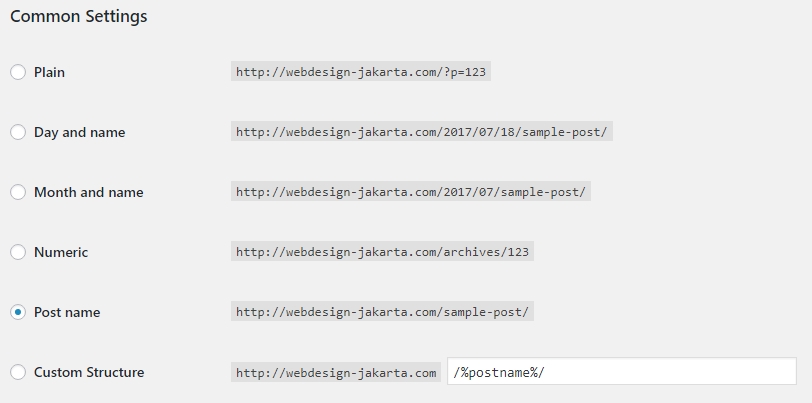
What Each Option Means
- Plain: Bad for SEO, because the URL says nothing clear about your content.
- Day and name: Not ideal for SEO. Even though it includes the post date, the URL gets too long once you add your keywords.
- Month and name: Like day and name, it keeps your SEO from being optimal.
- Numeric: Not a good choice for SEO. Nothing in the URL describes your page or content.
- Post name: The best choice for SEO-friendly URLs, because it isn't too long, and many WordPress users who know SEO use it.
- Custom structure: Here you can use special WordPress tags to customize your URLs. If you have a large website with several categories that matter to your readers, using tags such as /%category%/%postname%/ to add the category to the URL may make your site structure tidier. This gives Google more information about your content, but how detailed you get is up to you. For SEO, it's best to keep URLs to no more than 5 words.
A Note for Websites That Are Already Indexed
If you're thinking of switching from your old permalink structure to a new one, don't! You'll lose all your visitors. Content that already gets plenty of traffic from search engines will lose it when you change the URL structure; it's like resetting it to 0. Your content's search rankings will also drop or even disappear. The exception is content that doesn't get many visitors anyway: in that case, it's better to change the URL to make it more SEO-friendly.
2. Rewrite Your Content URLs for Better SEO
Here are some dos and don'ts for writing and rewriting URLs in WordPress:
- Check the URL! Remove irrelevant words and focus on your target keyword. Cut connecting words such as di, ke, dan and untuk (Indonesian for in, to, and, for). For example, for the keyword digital marketing agency jakarta, a URL like http://webdesign-jakarta.com/digital-marketing-agency-jakarta is better than http://webdesign-jakarta.com/digital-marketing-agency-di-jakarta.
- Keep URLs short. Long URLs make it harder to raise your content's rankings. The key is to put your main focus keyword in the URL and avoid unnecessary words.
- Apply both of the points above across your whole website or blog. Use hyphens ( - ) to separate words and avoid underscores (_).
3. Install an SSL Certificate
Make sure your website is fully encrypted with an SSL certificate, because it matters a great deal for your site's growth. HTTPS is now a minor ranking signal in Google's algorithm. Google also wants HTTPS to keep data secure in the browser. For both reasons, enabling HTTPS on your WordPress site can help you rank better and improve the user experience. WordPress premium users usually get Let's Encrypt with their hosting, because the service is free. There's no reason not to make the switch and help your site strengthen its URLs in Google's eyes.
The switch from http://webdesign-jakarta.com/ to https://webdesign-jakarta.com/ will apply to all your content and pages. It puts you in a much better position to rank well in search engines.
Keep in Mind!
If your website or blog still runs on http and has already been optimized for SEO, its rankings will very likely drop if you switch to https. If you have a new website, it's essential to install an SSL certificate right from the start.
4. Use an SEO Plugin
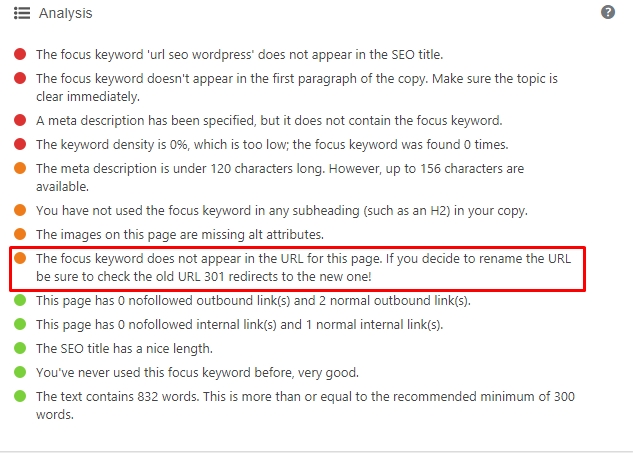
The SEO plugin most WordPress users rely on is the Yoast SEO plugin. It has a fairly complete set of content SEO features and is updated regularly. One of its features lets you check whether the URL structure you've created is right or not yet optimal. You can then change it by hand to match the focus keyword you want.
One More Thing
In SEO, there's no easy way to raise your content's rankings, because there are so many SEO factors. Even WordPress permalink settings considered SEO-friendly won't necessarily put your content at the top. It depends on your website's niche, content, industry or theme, your competitors, and how visitors rate the site. You can also apply these permalink settings to a custom-built website, because URLs set up this way benefit any site. Many custom websites (the kind meant to attract lots of visitors) have a tidy structure and a polished design but aren't SEO-friendly, which defeats the purpose of building the website at all.