How to Speed Up Your Website, Part 2: Find What Slows It Down
A slow website loses visitors and Google rankings. Here are the usual reasons a site takes too long to load, and how to track them down on yours.
webdesign-jakarta.com - This article continues our look at web design techniques that speed up your website. Last time, you learned how to cut the file size of the images on your site. So what other simple web design technique can help your site load faster? The next one is to cut back on Flash, or avoid it altogether. Flash can look really cool in a web design, but honestly, it makes your site very heavy to load. On top of that, a Flash web design looks bad and is hard to use on a mobile phone. Ask your web design vendor to use JavaScript instead, or a combination of HTML5 and CSS, which can create Flash-like effects at a far smaller file size. With this technique, your site will be lighter and easier for potential customers to access.
A website that's too heavy will drop in Google's rankings, and many visitors will leave because the page takes too long to load. Here's what you should know about the causes of a slow website, and how to speed up your website:
- A theme that's too heavy
- Bare-minimum hosting specs (server quality)
- Too many plugins & widgets
- Server overload from too many visitors
- Images with too high a resolution
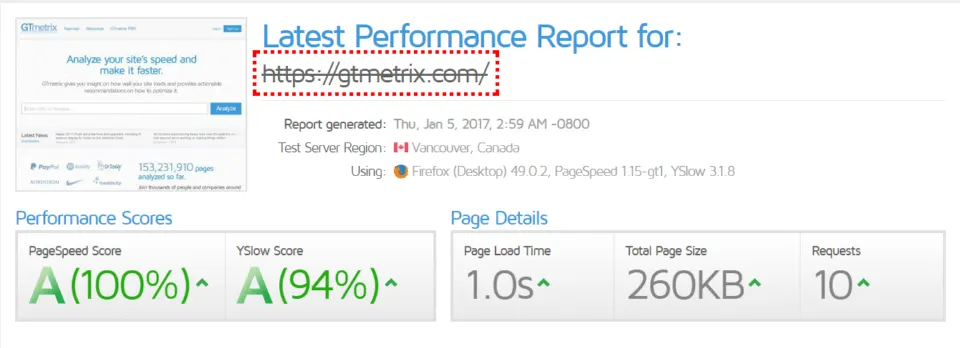
The fix is to cut back and change what's on the site so it loads faster. To check how fast or slow your website is, visit GTmetrix, which explains what's slowing your site down. See the example below:
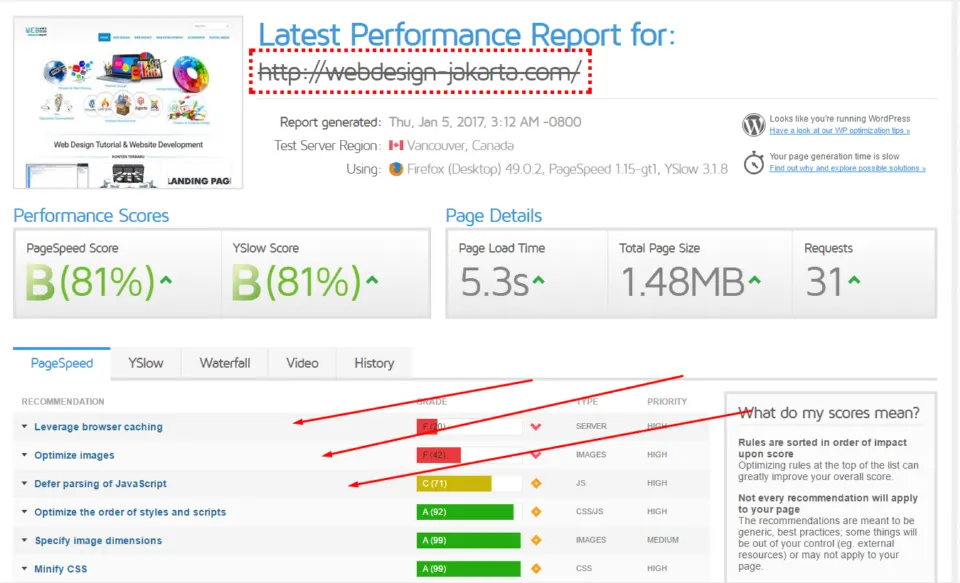
This website's page load score is fairly decent, but look closely and the report shows that browser caching, images and JavaScript are slowing it down a little. Fixing those three only takes trimming the work of a few plugins, resizing images, and reducing or removing some of the JavaScript on the site. Those are a few tips to make your website faster and keep it from lagging.